Sentiment Analysis with TextBlob
Sentiment analysis and text exploration of a novel.


Introduction
This tutorial will go over the process of performing sentiment analysis on a text file, particularly a novel. This tutorial will use the TextBlob library which uses Natural Language Processing (NLP) to analyze the text and a free novel in the text file format from Project Gutenburg. Sentiment analysis is the process of analyzing the polarity (how positive or negative the text is which ranges from -1.0 (negative) to 1.0 (positive) [-1.0, 1.0]) and objectivity (how objective or subjective the text is which ranges from 0.0 (objective) to 1.0 (subjective) [0.0, 1.0]) of a sentence. One can determine if a sentence exhibits negative or positive behavior or if it is more of an opinion than a fact. We will also use TextBlob to calculate the most commonly used words, the number of words, and other data from the novel.
Acquiring and Cleaning Text
There are many different locations that you can acquire text in order to perform sentiment analysis such as Twitter (sentiment of tweets including a certain #hashtag), IMDB (sentiment of movie reviews), or Amazon (sentiment of product reviews). This tutorial will perform sentiment analysis on a novel available on Project Gutenburg as a text file. The novel chosen was Pride and Prejudice by Jane Austen. Once you acquire the text, you have to clean it a bit so TextBlob does not parse it in a way that you don’t want it to. For example, the novel text files from Project Gutenburg have some text at the beginning and at the end of the novel which provide information about Project Gutenburg that is not relevant to the novel which we can go ahead and delete. I have also deleted the title and author of the novel as my code looks for the chapter headers in order to analyze the data as seen later on in the code.
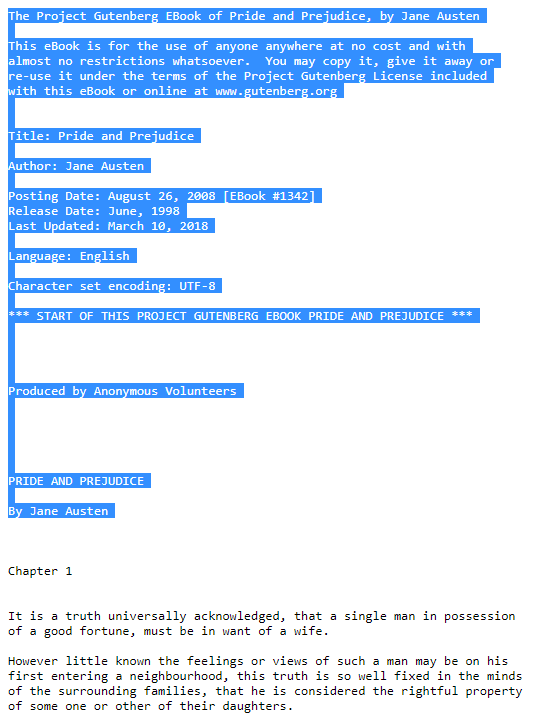 Beginning Text
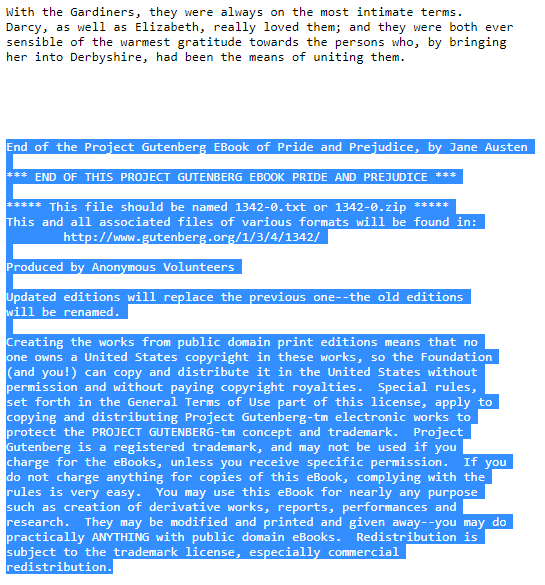 End Text
Cleaning up the text file can sometimes be as easy as deleting some text in certain sections of the text file but sometimes it can be a lot more difficult. For example, the way I set up my code, it looks for the chapter headers in order to recognize when a new chapter has started. However, if the text file is passed into TextBlob in its current state, TextBlob will think the chapter headers are part of the sentence immediately after since the chapter headers do not have a punctuation mark at the end of the header. Looking at the screenshot of the text file above, TextBlob will think “Chapter 1 It is a truth universally acknowledged…” is one whole sentence. In order to have two sentences, we will need to make each of the chapter headers have a punctuation mark, i.e. “Chapter 1.” instead of “Chapter 1” without a period. This is where coding comes in handy.
The first section of the Python code can be seen below. Lines 1-9 import the necessary libraries for this code (you might need to uncomment line 7 in order to download the necessary NLP libraries). Lines 11-12 open the text file and read it. Lines 18-33 contain the code that actually cleans up the text file even further. Lines 18 and 19 replace quotation marks with spaces in the text file as quotation marks also cause TextBlob to parse multiple sentences together. For example:
- “My dear Mr. Bennet,” said his lady to him one day, “have you heard that Netherfield Park is let at last?” Mr. Bennet replied that he had not.
is one whole sentence instead of two:
- My dear Mr. Bennet, said his lady to him one day, have you heard that Netherfield Park is let at last?
- Mr. Bennet replied that he had not.
Line 20 replaces underscores with spaces as this just signifies that the text is italicized. Lines 27-30 create ‘sentences’ from the chapter headers as mentioned in the previous paragraph. The regular expression library re was used to find different instances of the word ‘Chapter’ with 1 or 2 digits \d{1,2} and a space \s after it in order to create the new sentences. The space was needed so the regular expression library wouldn’t confuse Chapter 1 with Chapter 10, Chapter 11, and others. Line 32 replaces the newline character with a space so sentences that are multiple lines are on the same line. Finally, line 33 feeds the clean text file into the TextBlob library for analysis.
1
2
3
4
5
6
7
8
9
10
11
12
13
14
15
16
17
18
19
20
21
22
23
24
25
26
27
28
29
30
31
32
33
34
from textblob import TextBlob
import pandas as pd
from collections import Counter
import matplotlib.pyplot as plt
import matplotlib.patheffects as pe
import nltk
# nltk.download()
import re
import numpy as np

file=open('Pride and Prejudice by Jane Austen.txt' ,encoding="utf-8-sig"); # Encoding removes the byte order mark at beginning of text
t=file.read();

#Clean up text file for better analysis

#Remove extra text that does not have to do with the actual novel, e.g. Project Gutenberg text at beginning and end of file
#Cleaning up the text file by deleting or replacing characters that causes issues with TextBlob
t = t.replace('“', ''); #Quotes cause issues because they 'combine sentences'
t = t.replace('”', '');
t = t.replace('_', ''); #Underscores signify italicization, remove them.

#Finds all chapter headings and creates 'sentences' out of them so they are not combined with other sentences
#This is done because there is no period at the end of the chapter declaration, e.g. Chapter 1 instead of Chapter 1.
#This in turn causes TextBlob to combine the chapter declaration with the next sentence since it sees now punctuation

#Regex to find matches of Chapter + Number + Space. The space is needed so it doesn't confuse Chapter 1 with Chapter 10, 11, 12 etc...
matches = re.findall('Chapter '+'\d{1,2}\s', t) #'Chapter' + 1-2 digits \d{1,2} + space \s
print(matches)
for match in matches: #Cycles through matches in order to find them and replace them with itself + period to create new sentence
    t = re.sub(match, match.replace('\n','.'), t)

t = t.replace('\n', ' '); #Replace newline with space
blob = TextBlob(t) #Pass in clean text file to TextBlob
Gathering Data from Text File
Now that the text has been cleaned up, we can go ahead and start filling up a Pandas dataframe with pertinent data. Lines 36-39 (2-5) create a dataframe and some empty dictionaries in order to keep track of the data. Lines 42-94 (8-60) cycle through every sentence in the text file and gathers the pertinent data. Lines 97-186 (63-152) save the data as a .csv file and create bar and histogram charts from the data.
Lines 44-46 (10-12) and 94 (60) create counters for certain parts of speech (POS) that we will keep track of. Lines 57-61 (23-27) and 89-91 (55-57) fill the dataframe with data regarding the current sentence. Lines 64-86 (30-52) cycle through every word in the current sentence in order to find unique words or proper nouns (lines 67-78 (33-44)) or to count specific parts of speech in the sentence (lines 81-86 (47-52)). Each word has a ‘tag’ that states what part of speech it is which can be accessed as a tuple (word,tag) with .tag. The different parts of speech can be seen at (Alphabetical list of part-of-speech tags used in the Penn Treebank Project)[https://www.ling.upenn.edu/courses/Fall_2003/ling001/penn_treebank_pos.html].
Line 97 (63) saves the dataframe to a csv file for later access while lines 99-107 (65-73) print information about the text file. Lines 110-144 (76-110) calculate and plot the twenty most used words and proper nouns. Some proper nouns were removed because I did not want to include Mr., Mrs., etc. Lines 146-186 (112-152) plot histograms from the dataframe.
1
2
3
4
5
6
7
8
9
10
11
12
13
14
15
16
17
18
19
20
21
22
23
24
25
26
27
28
29
30
31
32
33
34
35
36
37
38
39
40
41
42
43
44
45
46
47
48
49
50
51
52
53
54
55
56
57
58
59
60
61
62
63
64
65
66
67
68
69
70
71
72
73
74
75
76
77
78
79
80
81
82
83
84
85
86
87
88
89
90
91
92
93
94
95
96
97
98
99
100
101
102
103
104
105
106
107
108
109
110
111
112
113
114
115
116
117
118
119
120
121
122
123
124
125
126
127
128
129
130
131
132
133
134
135
136
137
138
139
140
141
142
143
144
145
146
147
148
149
150
151
152
153
#Create Pandas DataFrame to store data
df=pd.DataFrame(columns=['Sentence', 'Tags','Polarity','Subjectivity','Number of Words','Number of Nouns','Number of Verbs','Number of Adjectives'])
sentencecount=0 #Counter for sentences
totalwords={} #Empty dictionary for keeping track of unique words
propernouns={} #Empty dictionary for keeping track of unique proper nouns

#Cycling through all the sentences in the text file
for sentence in blob.sentences:
    #Counters for nouns, verbs, and adjectives in current sentence
    nouns=0
    verbs=0
    adjectives=0

    #Printing pertinent information
    print('-------------------------------------------------New Sentence-------------------------------------------------')
    print(sentencecount)
    print(sentence) #Current sentence
    print(sentence.sentiment.polarity) #Current sentence polarity
    print(sentence.sentiment.subjectivity) #Current sentence subjectivity
    print(sentence.tags) #Current sentence words and their part of speech (POS) tag

    #Entering data into dataframe
    df.at[sentencecount, 'Sentence']= str(sentence)
    df.at[sentencecount, 'Tags'] = str(sentence.tags)
    df.at[sentencecount, 'Polarity'] = sentence.sentiment.polarity
    df.at[sentencecount, 'Subjectivity'] = sentence.sentiment.subjectivity
    df.at[sentencecount, 'Number of Words'] = len(sentence.words)

    #Cycling through every word in current sentence
    for word in sentence.tags:

        #Checks if current word is in the unique word dictionary
        if word not in totalwords: #If not, adds it to unique word dictonary with value of 1 (first appearance)
            totalwords[word] = 1
        else: #If it is, adds 1 to its value for subsequent appearances
            totalwords[word] += 1

        #List of tags https://www.ling.upenn.edu/courses/Fall_2003/ling001/penn_treebank_pos.html

        if word[1] == 'NNP': #Checks if current word is proper noun so it can add it to the proper noun dictionary
            if word not in propernouns:
                propernouns[word] = 1
            else:
                propernouns[word] += 1

        #Cheks if current word is a noun, verb, or adjective so it can add to the corresponding count
        if word[1]=='NN' or word[1]=='NNS':
            nouns+=1
        if word[1] == 'VB' or word[1]=='VBD' or word[1]=='VBG' or word[1]=='VBN' or word[1]=='VBP' or word[1]=='VBZ':
            verbs += 1
        if word[1] == 'JJ' or word[1]=='JJR' or word[1]=='JJS':
            adjectives += 1

    #Entering word count data into dataframe
    df.at[sentencecount, 'Number of Nouns'] = nouns
    df.at[sentencecount, 'Number of Verbs'] = verbs
    df.at[sentencecount, 'Number of Adjectives'] = adjectives

    #Counter for sentences
    sentencecount+=1

#Saves dataframe to csv file
df.to_csv('Sentiment Analysis.csv')

print('------------------------------------------------Text Information------------------------------------------------')
print(df.head())
print('Total Number of Sentences: ',sentencecount)
print('Total Number of Words: ',df['Number of Words'].sum()-61*2) #-61*2 because of 61 chapters and 2 words Chapter and ##
print('Total Number of Nouns: ',df['Number of Nouns'].sum()-61) #-61 because of 61 chapters, chapter is a noun
print('Total Number of Verbs: ',df['Number of Verbs'].sum())
print('Total Number of Adjectives: ',df['Number of Adjectives'].sum())
print('Total Number of Unique Words: ', len(totalwords))
print('Total Number of Unique Proper Nouns: ', len(propernouns))

#Calculating 20 most used words and proper nouns
tw = dict(Counter(totalwords).most_common(20))
print('Twenty most used words: ',tw)

#Deleting certain proper nouns from dictionary
propernouns.pop(('Mr.', 'NNP'))
propernouns.pop(('Mrs.', 'NNP'))
propernouns.pop(('Lady', 'NNP'))
propernouns.pop(('Miss', 'NNP'))
propernouns.pop(('Colonel', 'NNP'))
propernouns.pop(('Sir', 'NNP'))

pn = dict(Counter(propernouns).most_common(20))
print('Twenty most used Proper nouns: ',pn)

#Bar Chart for 20 most used words
fig, ax0 = plt.subplots(figsize=(19.2,10.8))

ax0.bar(range(len(tw)), list(tw.values()), align='center')
ax0.set_title('Most Used  Words')
ax0.set_xlabel('Word and Tag')
ax0.set_ylabel('Word Count')
plt.xticks(range(len(tw)), list(tw.keys()),rotation=90)

fig.savefig('Word_Count.png',bbox_inches = "tight")

#Bar Chart for 20 most used proper ouns
fig1, ax1 = plt.subplots(figsize=(19.2,10.8))

ax1.bar(range(len(pn)), list(pn.values()), align='center')
ax1.set_title('Most Used Proper nouns')
ax1.set_xlabel('Word and Tag')
ax1.set_ylabel('Word Count')
plt.xticks(range(len(pn)), list(pn.keys()),rotation=90)

fig1.savefig('Proper_noun_Count.png',bbox_inches = "tight")

#Histogram charts for text file
fig5, [(ax18,ax19),(ax20,ax21),(ax22,ax23)] = plt.subplots(3,2,figsize=(19.2,10.8))
fig5.subplots_adjust(hspace=.5)

h=sorted(df['Polarity'])
ax18.hist(h,bins='auto',color='tab:blue')
ax18.set_title('Polarity $\mu=$'+str(round(np.mean(h),4))+ ' $\sigma=$'+str(round(np.std(h),4)))
ax18.set_ylabel('Number of Occurrences', color='tab:blue')
ax18.tick_params('y', color='tab:blue')

h=sorted(df['Subjectivity'])
ax19.hist(h,bins='auto',color='tab:blue')
ax19.set_title('Subjectivity $\mu=$'+str(round(np.mean(h),4))+ ' $\sigma=$'+str(round(np.std(h),4)))
ax19.set_ylabel('Number of Occurrences', color='tab:blue')
ax19.tick_params('y', color='tab:blue')

h=sorted(df['Number of Words'])
ax20.hist(h,bins='auto',color='tab:blue')
ax20.set_title('Number of Words $\mu=$'+str(round(np.mean(h),4))+ ' $\sigma=$'+str(round(np.std(h),4)))
ax20.set_ylabel('Number of Occurrences', color='tab:blue')
ax20.tick_params('y', color='tab:blue')

h=sorted(df['Number of Nouns'])
ax21.hist(h,bins='auto',color='tab:blue')
ax21.set_title('Number of Nouns $\mu=$'+str(round(np.mean(h),4))+ ' $\sigma=$'+str(round(np.std(h),4)))
ax21.set_ylabel('Number of Occurrences', color='tab:blue')
ax21.tick_params('y', color='tab:blue')

h=sorted(df['Number of Verbs'])
ax22.hist(h,bins='auto',color='tab:blue')
ax22.set_title('Number of Verbs $\mu=$'+str(round(np.mean(h),4))+ ' $\sigma=$'+str(round(np.std(h),4)))
ax22.set_ylabel('Number of Occurrences', color='tab:blue')
ax22.tick_params('y', color='tab:blue')

h=sorted(df['Number of Adjectives'])
ax23.hist(h,bins='auto',color='tab:blue')
ax23.set_title('Number of Adjectives $\mu=$'+str(round(np.mean(h),4))+ ' $\sigma=$'+str(round(np.std(h),4)))
ax23.set_ylabel('Number of Occurrences', color='tab:blue')
ax23.tick_params('y', color='tab:blue')

fig5.savefig('Histogram for Text File.png',bbox_inches = "tight")
Text File Charts
The bar charts can be seen below. Looking at the Twenty Most Used Words bar chart, one can see that words such as ‘to’, ‘the’, ‘of’, ‘and’, and ‘I’ show up a lot as these are some pretty common words in the English language. Observing the Twenty Most Used Proper Nouns bar chart, one can determine who the main characters are of the novel or which characters have a big influence in the novel. Elizabeth Bennet is the protagonist of Pride and Prejudice and Fitzwilliam Darcy is her love interest. Jane Bennet is Elizabeth’s sister and Charles Bingley is Jane’s love interest.
| Total Number of | Count |
|---|---|
| Sentences | 6013 |
| Words | 122524 |
| Nouns | 18127 |
| Verbs | 23724 |
| Adjectives | 7725 |
| Unique Words | 8753 |
| Unique Proper Nouns | 305 |
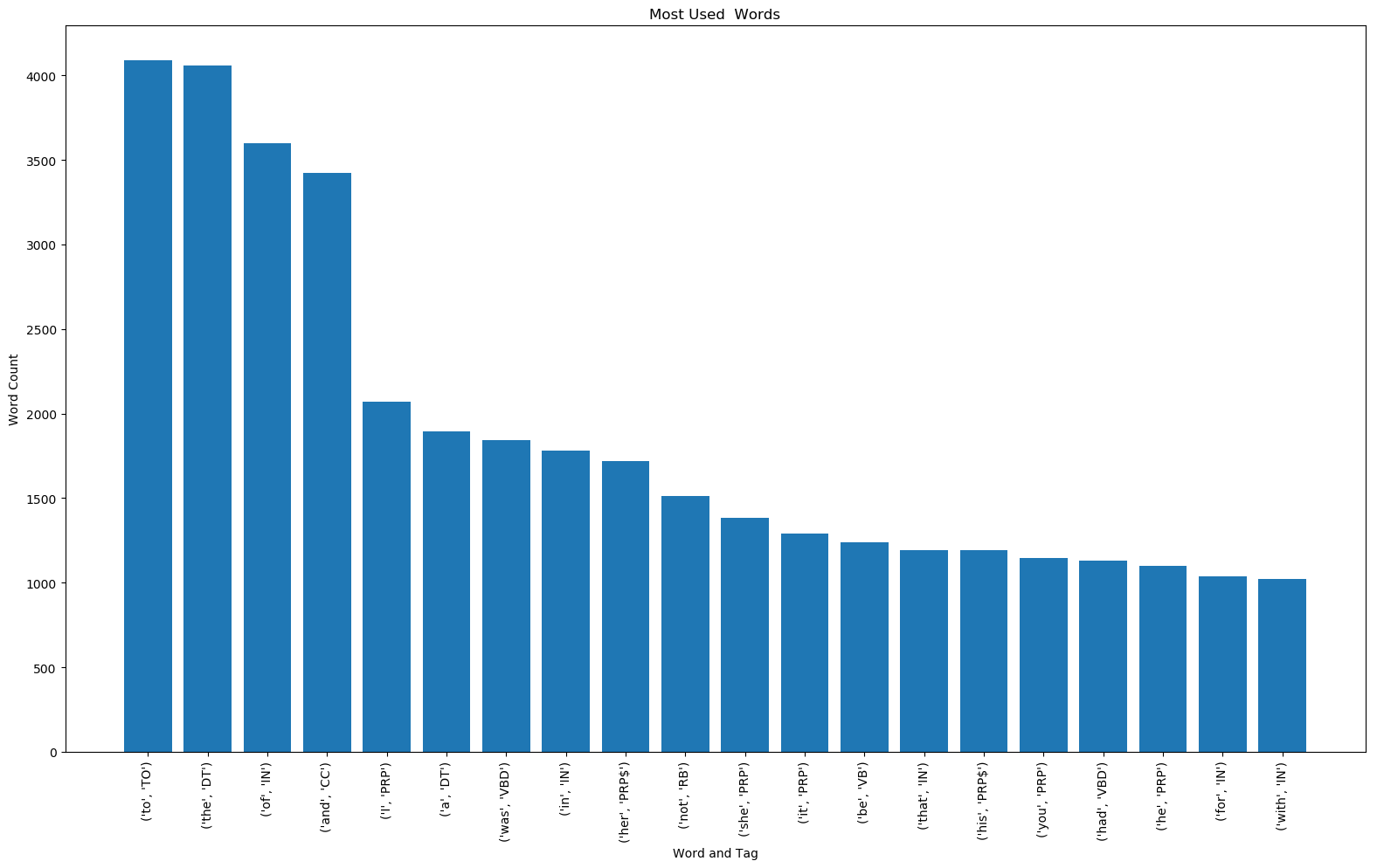 Twenty Most Used Words
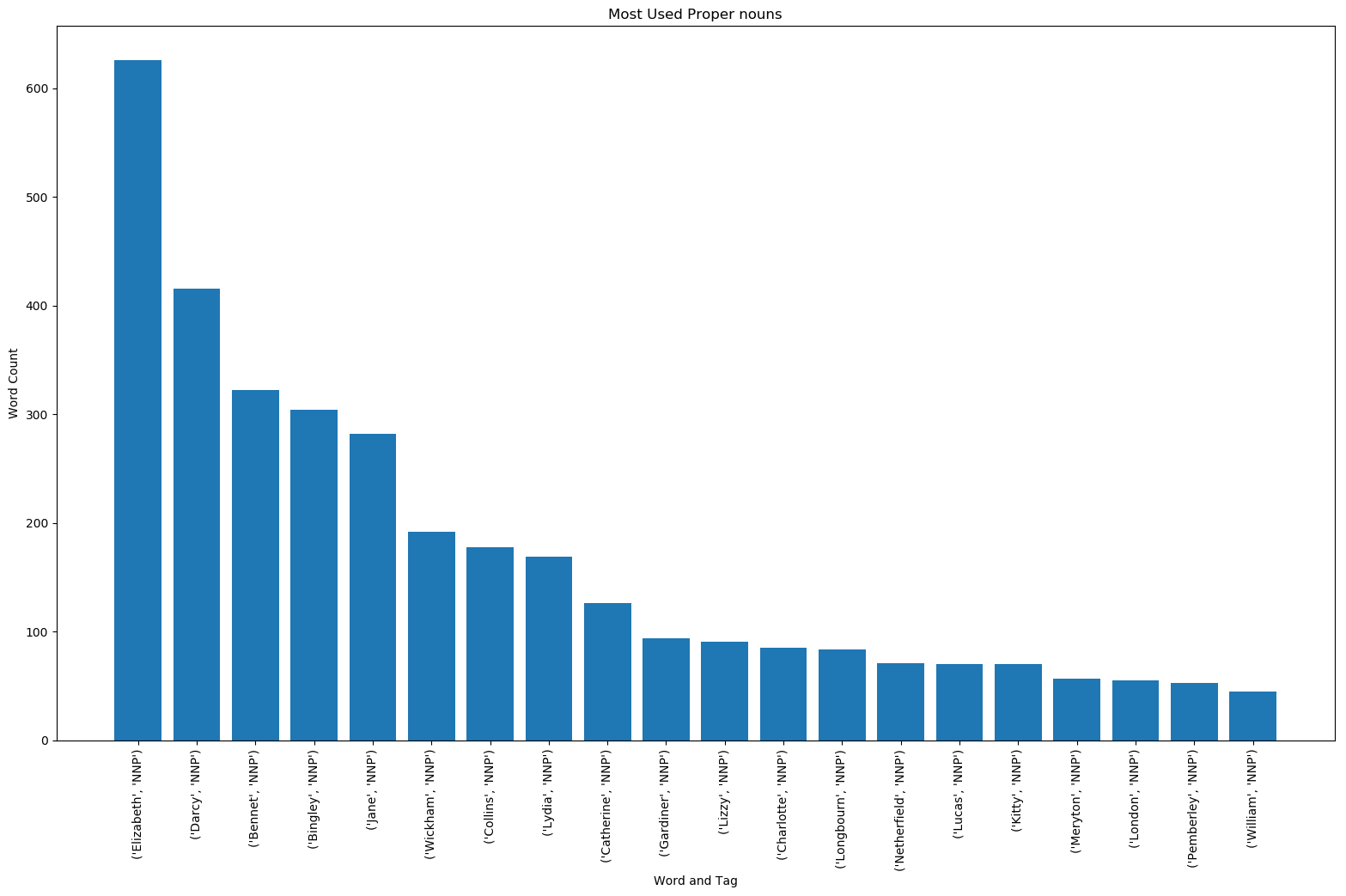 Twenty Most Used Proper Nouns
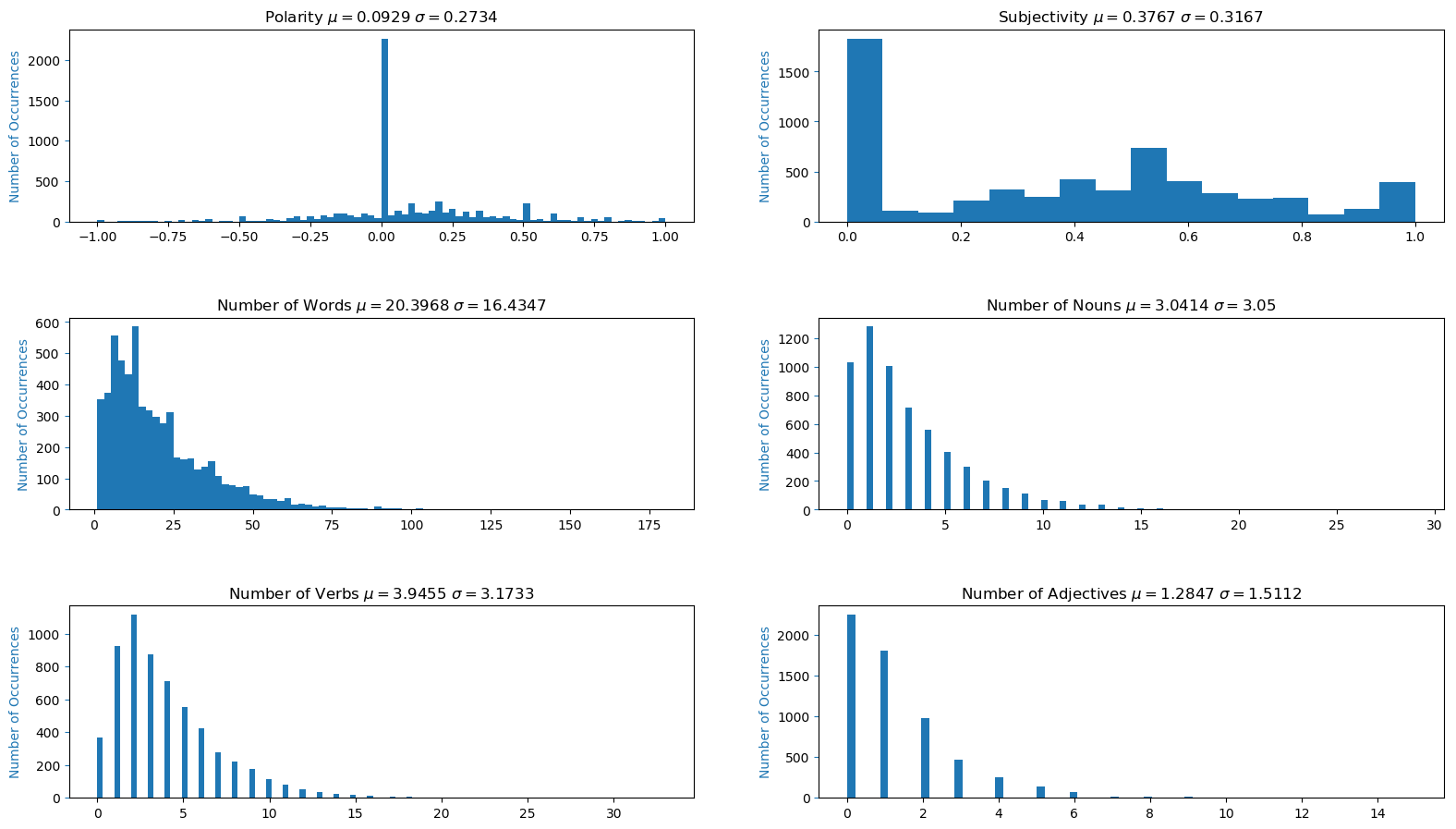
The histogram charts, which are based on a per sentence basis, can be seen below. Most sentences from the novel are fairly neutral and objective. Most of the sentences have between 1-25 words, 0-5 nouns, 0-5 verbs, and 0-2 adjectives. It would be interesting to try and fit a distribution to this data and calculate its Probability Density Function (PDF for continuous distributions) or its Probability Mass Function (PMF for discrete distributions) and its Cumulative Distribution Function (CMF). I will leave that for a later project.
 Histogram for Text File
Gathering Data from Each Chapter
Now that we have data for the whole novel, we can start breaking it down by chapter. As mentioned in the Acquiring and Cleaning Text Section, creating sentences out of the chapter headers allows us to isolate data for each chapter. Lines 190-194 (3-7) cycle through the text file dataframe created earlier in order to find the location of the row indices for each chapter. Lines 197-209 (10-22) create a new dataframe for chapter specific data. Lines 212-240 (25-53) calculate the sum and mean of certain data for each chapter. The mean is based off of the number of sentences for that specific chapter. Lines 243-253 (56-66) calculate the expanding mean of the data (keeps calculating the mean as the number of chapters increase). Lines 256-439 (69-252) save the data to a csv file, create bar and histogram charts, and print some of the data that was calculated.
1
2
3
4
5
6
7
8
9
10
11
12
13
14
15
16
17
18
19
20
21
22
23
24
25
26
27
28
29
30
31
32
33
34
35
36
37
38
39
40
41
42
43
44
45
46
47
48
49
50
51
52
53
54
55
56
57
58
59
60
61
62
63
64
65
66
67
68
69
70
71
72
73
74
75
76
77
78
79
80
81
82
83
84
85
86
87
88
89
90
91
92
93
94
95
96
97
98
99
100
101
102
103
104
105
106
107
108
109
110
111
112
113
114
115
116
117
118
119
120
121
122
123
124
125
126
127
128
129
130
131
132
133
134
135
136
137
138
139
140
141
142
143
144
145
146
147
148
149
150
151
152
153
154
155
156
157
158
159
160
161
162
163
164
165
166
167
168
169
170
171
172
173
174
175
176
177
178
179
180
181
182
183
184
185
186
187
188
189
190
191
192
193
194
195
196
197
198
199
200
201
202
203
204
205
206
207
208
209
210
211
212
213
214
215
216
217
218
219
220
221
222
223
224
225
226
227
228
229
230
231
232
233
234
235
236
237
238
239
240
241
242
243
244
245
246
247
248
249
250
251
252
print('----------------------------------------------Chapter Information----------------------------------------------')
#Cycles through chapters to acquire row index in dataframe for that chapter
chapters={}
for match in matches:
    print(match.replace('\n','.'),df.loc[df['Sentence']== match.replace('\n','.')].index.values)
    chapters[match.replace('\n','.')]=int(df.loc[df['Sentence']== match.replace('\n','.')].index.values)
ch_list=list(chapters.items())

#Creating new dataframe for chapter specific data
df_ch=pd.DataFrame(columns=['Chapter',
                      'Number of Sentences',
                      'Average Polarity',
                      'Average Subjectivity',
                      'Total Number of Words',
                      'Average Number of Words',
                      'Total Number of Nouns',
                      'Average Number of Nouns',
                      'Total Number of Verbs',
                      'Average Number of Verbs',
                      'Total Number of Adjectives',
                      'Average Number of Adjectives',
                      ])

#Cycles through original dataframe with row indices for each chapter in order to calculate means of each chapter
for i, (key, value) in enumerate(chapters.items()):
   print(i, key, value)

   if i < len(ch_list)-1: #All chapters except last chapter
        df_ch.at[i, 'Chapter']=key
        df_ch.at[i, 'Number of Sentences'] = ch_list[i+1][1]-1-value
        df_ch.at[i, 'Average Polarity'] = df.loc[value+1:ch_list[i+1][1]-1,'Polarity'].mean()
        df_ch.at[i, 'Average Subjectivity'] = df.loc[value + 1:ch_list[i + 1][1] - 1, 'Subjectivity'].mean()
        df_ch.at[i, 'Total Number of Words'] = df.loc[value + 1:ch_list[i + 1][1] - 1, 'Number of Words'].sum()
        df_ch.at[i, 'Average Number of Words'] = df.loc[value + 1:ch_list[i + 1][1] - 1, 'Number of Words'].mean()
        df_ch.at[i, 'Total Number of Nouns'] = df.loc[value + 1:ch_list[i + 1][1] - 1, 'Number of Nouns'].sum()
        df_ch.at[i, 'Average Number of Nouns'] = df.loc[value + 1:ch_list[i + 1][1] - 1, 'Number of Nouns'].mean()
        df_ch.at[i, 'Total Number of Verbs'] = df.loc[value + 1:ch_list[i + 1][1] - 1, 'Number of Verbs'].sum()
        df_ch.at[i, 'Average Number of Verbs'] = df.loc[value + 1:ch_list[i + 1][1] - 1, 'Number of Verbs'].mean()
        df_ch.at[i, 'Total Number of Adjectives'] = df.loc[value + 1:ch_list[i + 1][1] - 1, 'Number of Adjectives'].sum()
        df_ch.at[i, 'Average Number of Adjectives'] = df.loc[value + 1:ch_list[i + 1][1] - 1, 'Number of Adjectives'].mean()
   else: #Last chapter
        df_ch.at[i, 'Chapter'] = key
        df_ch.at[i, 'Number of Sentences'] =  sentencecount-1-value
        df_ch.at[i, 'Average Polarity'] = df.loc[value + 1:, 'Polarity'].mean()
        df_ch.at[i, 'Average Subjectivity'] = df.loc[value + 1:, 'Subjectivity'].mean()
        df_ch.at[i, 'Total Number of Words'] = df.loc[value + 1:, 'Number of Words'].sum()
        df_ch.at[i, 'Average Number of Words'] = df.loc[value + 1:, 'Number of Words'].mean()
        df_ch.at[i, 'Total Number of Nouns'] = df.loc[value + 1:, 'Number of Nouns'].sum()
        df_ch.at[i, 'Average Number of Nouns'] = df.loc[value + 1:, 'Number of Nouns'].mean()
        df_ch.at[i, 'Total Number of Verbs'] = df.loc[value + 1:, 'Number of Verbs'].sum()
        df_ch.at[i, 'Average Number of Verbs'] = df.loc[value + 1:, 'Number of Verbs'].mean()
        df_ch.at[i, 'Total Number of Adjectives'] = df.loc[value + 1:, 'Number of Adjectives'].sum()
        df_ch.at[i, 'Average Number of Adjectives'] = df.loc[value + 1:, 'Number of Adjectives'].mean()

#Expanding mean takes into account all previous values, rolling mean only takes into account a window of values
df_ch['Number of Sentences Expanding Mean'] = df_ch['Number of Sentences'].expanding().mean()#.rolling(window=2).mean()
df_ch['Average Polarity Expanding Mean'] = df_ch['Average Polarity'].expanding().mean()
df_ch['Average Subjectivity Expanding Mean'] = df_ch['Average Subjectivity'].expanding().mean()
df_ch['Total Number of Words Expanding Mean'] = df_ch['Total Number of Words'].expanding().mean()
df_ch['Total Number of Nouns Expanding Mean'] = df_ch['Total Number of Nouns'].expanding().mean()
df_ch['Total Number of Verbs Expanding Mean'] = df_ch['Total Number of Verbs'].expanding().mean()
df_ch['Total Number of Adjectives Expanding Mean'] = df_ch['Total Number of Adjectives'].expanding().mean()
df_ch['Average Number of Words Expanding Mean'] = df_ch['Average Number of Words'].expanding().mean()
df_ch['Average Number of Nouns Expanding Mean'] = df_ch['Average Number of Nouns'].expanding().mean()
df_ch['Average Number of Verbs Expanding Mean'] = df_ch['Average Number of Verbs'].expanding().mean()
df_ch['Average Number of Adjectives Expanding Mean'] = df_ch['Average Number of Adjectives'].expanding().mean()

#Saves chapter dataframe to csv
df_ch.to_csv('Chapters.csv')
print(df_ch.head())

#Plots for Chapter Data
ax2 = df_ch.plot.line(x=df_ch.index,y=['Average Polarity Expanding Mean','Average Subjectivity Expanding Mean'],marker='o',path_effects=[pe.Stroke(linewidth=3, foreground='k'), pe.Normal()])
df_ch[['Average Polarity','Average Subjectivity']].plot(kind='bar', title ='Average Polarity and Average Subjectivity per Chapter', figsize=(19.2,10.8),legend=True, fontsize=12,xticks=df_ch.index, rot=90,ax=ax2)
ax2.set_xlabel('Chapter')
ax2.set_ylabel('Average Polarity and Average Subjectivity')
ax2.set_xticklabels(df_ch['Chapter'])
plt.savefig('Average Polarity and Average Subjectivity per Chapter.png',bbox_inches = "tight")

ax3 = df_ch.plot.line(x=df_ch.index,y='Number of Sentences Expanding Mean',marker='o',path_effects=[pe.Stroke(linewidth=3, foreground='k'), pe.Normal()])
df_ch[['Number of Sentences']].plot(kind='bar', title ='Number of Sentences per Chapter', figsize=(19.2,10.8),legend=True, fontsize=12,xticks=df_ch.index, rot=90,ax=ax3)
ax3.set_xlabel('Chapter')
ax3.set_ylabel('Number of Sentences')
ax3.set_xticklabels(df_ch['Chapter'])
plt.savefig('Number of Sentences per Chapter.png',bbox_inches = "tight")

ax4 = df_ch.plot.line(x=df_ch.index,y='Total Number of Words Expanding Mean',marker='o',path_effects=[pe.Stroke(linewidth=3, foreground='k'), pe.Normal()])
df_ch[['Total Number of Words']].plot(kind='bar', title ='Number of Words per Chapter', figsize=(19.2,10.8),legend=True, fontsize=12,xticks=df_ch.index, rot=90,ax=ax4)
ax4.set_xlabel('Chapter')
ax4.set_ylabel('Words')
ax4.set_xticklabels(df_ch['Chapter'])
plt.savefig('Number of Words per Chapter.png',bbox_inches = "tight")

ax5 = df_ch.plot.line(x=df_ch.index,y=['Total Number of Nouns Expanding Mean','Total Number of Verbs Expanding Mean','Total Number of Adjectives Expanding Mean'],marker='o',path_effects=[pe.Stroke(linewidth=3, foreground='k'), pe.Normal()])
df_ch[['Total Number of Nouns', 'Total Number of Verbs','Total Number of Adjectives']].plot(kind='bar', title ='Specific Number of Words per Chapter', figsize=(19.2,10.8),legend=True, fontsize=12,xticks=df_ch.index, rot=90,ax=ax5)
ax5.set_xlabel('Chapter')
ax5.set_ylabel('Words')
ax5.set_xticklabels(df_ch['Chapter'])
plt.savefig('Specific Number of Words per Chapter.png',bbox_inches = "tight")

ax6 = df_ch.plot.line(x=df_ch.index,y='Average Number of Words Expanding Mean',marker='o',path_effects=[pe.Stroke(linewidth=3, foreground='k'), pe.Normal()])
df_ch[['Average Number of Words']].plot(kind='bar', title ='Average Number of Words per Chapter', figsize=(19.2,10.8),legend=True, fontsize=12,xticks=df_ch.index, rot=90,ax=ax6)
ax6.set_xlabel('Chapter')
ax6.set_ylabel('Average Words')
ax6.set_xticklabels(df_ch['Chapter'])
plt.savefig('Average Number of Words per Chapter.png',bbox_inches = "tight")

ax7 = df_ch.plot.line(x=df_ch.index,y=['Average Number of Nouns Expanding Mean','Average Number of Verbs Expanding Mean','Average Number of Adjectives Expanding Mean'],marker='o',path_effects=[pe.Stroke(linewidth=3, foreground='k'), pe.Normal()])
df_ch[['Average Number of Nouns', 'Average Number of Verbs','Average Number of Adjectives']].plot(kind='bar', title ='Specific Average Number of Words per Chapter', figsize=(19.2,10.8),legend=True, fontsize=12,xticks=df_ch.index, rot=90,ax=ax7)
ax7.set_xlabel('Chapter')
ax7.set_ylabel('Average Words')
ax7.set_xticklabels(df_ch['Chapter'])
plt.savefig('Average Specific Number of Words per Chapter.png',bbox_inches = "tight")


fig2, (ax8,ax9) = plt.subplots(2,1,figsize=(19.2,10.8))
fig2.subplots_adjust(hspace=.5)

h=sorted(df_ch['Total Number of Words'])
ax8.hist(h,bins='auto',color='tab:blue')
ax8.set_title('Total Number of Words per Chapter $\mu=$'+str(round(np.mean(h),4))+ ' $\sigma=$'+str(round(np.std(h),4)))
ax8.set_ylabel('Number of Occurrences', color='tab:blue')
ax8.tick_params('y', color='tab:blue')

h=sorted(df_ch['Average Number of Words'])
ax9.hist(h,bins='auto',color='tab:blue')
ax9.set_title('Avg. Number of Words per Chapter $\mu=$'+str(round(np.mean(h),4))+ ' $\sigma=$'+str(round(np.std(h),4)))
ax9.set_ylabel('Number of Occurrences', color='tab:blue')
ax9.tick_params('y', color='tab:blue')

fig2.savefig('Histogram of Words per Chapter.png',bbox_inches = "tight")


fig3, (ax10,ax11) = plt.subplots(2,1,figsize=(19.2,10.8))
fig3.subplots_adjust(hspace=.5)
h=sorted(df_ch['Average Polarity'])
ax10.hist(h,bins='auto',color='tab:blue')
ax10.set_title('Avg. Polarity per Chapter $\mu=$'+str(round(np.mean(h),4))+ ' $\sigma=$'+str(round(np.std(h),4)))
ax10.set_ylabel('Number of Occurrences', color='tab:blue')
ax10.tick_params('y', color='tab:blue')

h=sorted(df_ch['Average Subjectivity'])
ax11.hist(h,bins='auto',color='tab:blue')
ax11.set_title('Avg. Subjectivity per Chapter $\mu=$'+str(round(np.mean(h),4))+ ' $\sigma=$'+str(round(np.std(h),4)))
ax11.set_ylabel('Number of Occurrences', color='tab:blue')
ax11.tick_params('y', color='tab:blue')

fig3.savefig('Histogram of Polarity and Subjectivity per Chapter.png',bbox_inches = "tight")


fig4, [(ax12,ax13),(ax14,ax15),(ax16,ax17)] = plt.subplots(3,2,figsize=(19.2,10.8))
fig4.subplots_adjust(hspace=.5)

h=sorted(df_ch['Total Number of Nouns'])
ax12.hist(h,bins='auto',color='tab:blue')
ax12.set_title('Total Number of Nouns per Chapter $\mu=$'+str(round(np.mean(h),4))+ ' $\sigma=$'+str(round(np.std(h),4)))
ax12.set_ylabel('Number of Occurrences', color='tab:blue')
ax12.tick_params('y', color='tab:blue')

h=sorted(df_ch['Average Number of Nouns'])
ax13.hist(h,bins='auto',color='tab:blue')
ax13.set_title('Avg. Number of Nouns per Chapter $\mu=$'+str(round(np.mean(h),4))+ ' $\sigma=$'+str(round(np.std(h),4)))
ax13.set_ylabel('Number of Occurrences', color='tab:blue')
ax13.tick_params('y', color='tab:blue')

h=sorted(df_ch['Total Number of Verbs'])
ax14.hist(h,bins='auto',color='tab:blue')
ax14.set_title('Total Number of Verbs per Chapter $\mu=$'+str(round(np.mean(h),4))+ ' $\sigma=$'+str(round(np.std(h),4)))
ax14.set_ylabel('Number of Occurrences', color='tab:blue')
ax14.tick_params('y', color='tab:blue')

h=sorted(df_ch['Average Number of Verbs'])
ax15.hist(h,bins='auto',color='tab:blue')
ax15.set_title('Avg. Number of Verbs per Chapter $\mu=$'+str(round(np.mean(h),4))+ ' $\sigma=$'+str(round(np.std(h),4)))
ax15.set_ylabel('Number of Occurrences', color='tab:blue')
ax15.tick_params('y', color='tab:blue')

h=sorted(df_ch['Total Number of Adjectives'])
ax16.hist(h,bins='auto',color='tab:blue')
ax16.set_title('Total Number of Adjectives per Chapter $\mu=$'+str(round(np.mean(h),4))+ ' $\sigma=$'+str(round(np.std(h),4)))
ax16.set_ylabel('Number of Occurrences', color='tab:blue')
ax16.tick_params('y', color='tab:blue')

h=sorted(df_ch['Average Number of Adjectives'])
ax17.hist(h,bins='auto',color='tab:blue')
ax17.set_title('Number of Adjectives per Chapter $\mu=$'+str(round(np.mean(h),4))+ ' $\sigma=$'+str(round(np.std(h),4)))
ax17.set_ylabel('Number of Occurrences', color='tab:blue')
ax17.tick_params('y', color='tab:blue')

fig4.savefig('Histogram of Specific Words per Chapter.png',bbox_inches = "tight")


fig6, ax24 = plt.subplots(figsize=(19.2,10.8))
fig6.subplots_adjust(hspace=.5)

h=sorted(df_ch['Number of Sentences'])
ax24.hist(h,bins='auto',color='tab:blue')
ax24.set_title('Number of Sentences per Chapter $\mu=$'+str(round(np.mean(h),4))+ ' $\sigma=$'+str(round(np.std(h),4)))
ax24.set_ylabel('Number of Occurrences', color='tab:blue')
ax24.tick_params('y', color='tab:blue')

fig6.savefig('Histogram of Number of Sentences per Chapter.png',bbox_inches = "tight")

df_ch=df_ch.apply(pd.to_numeric, errors='ignore') #Converts suitable columns to numeric (some are object)

print('Mean Number of Sentences per Chapter: ',df_ch['Number of Sentences'].mean())
print('Mean Total Number of Words per Chapter: ',df_ch['Total Number of Words'].mean())
print('Mean Average Number of Words per Chapter: ',df_ch['Average Number of Words'].mean())
print('Mean Average Polarity per Chapter: ',df_ch['Average Polarity'].mean())
print('Mean Average Subjectivity per Chapter: ',df_ch['Average Subjectivity'].mean())
print('Mean Total Number of Nouns per Chapter: ',df_ch['Total Number of Nouns'].mean())
print('Mean Average Number of Nouns per Chapter: ',df_ch['Average Number of Nouns'].mean())
print('Mean Total Number of Verbs per Chapter: ',df_ch['Total Number of Verbs'].mean())
print('Mean Average Number of Verbs per Chapter: ',df_ch['Average Number of Verbs'].mean())
print('Mean Total Number of Adjectives per Chapter: ',df_ch['Total Number of Adjectives'].mean())
print('Mean Average Number of Adjectives per Chapter: ',df_ch['Average Number of Adjectives'].mean())

#Calculates the Top 3 and Bottom 3 values of data and outputs them into HTML format for website
print('Chapters with Most Number of Sentences: \n',df_ch.nlargest(3, 'Number of Sentences')[['Chapter','Number of Sentences']].to_html(index=False))
print('Chapters with Least Number of Sentences: \n',df_ch.nsmallest(3, 'Number of Sentences')[['Chapter','Number of Sentences']].to_html(index=False))

print('Chapters with Most Total Number of Words: \n',df_ch.nlargest(3, 'Total Number of Words')[['Chapter','Total Number of Words']].to_html(index=False))
print('Chapters with Least Total Number of Words: \n',df_ch.nsmallest(3, 'Total Number of Words')[['Chapter','Total Number of Words']].to_html(index=False))

print('Chapters with Most Average Number of Words: \n',df_ch.nlargest(3, 'Average Number of Words')[['Chapter','Average Number of Words']].to_html(index=False))
print('Chapters with Least Average Number of Words: \n',df_ch.nsmallest(3, 'Average Number of Words')[['Chapter','Average Number of Words']].to_html(index=False))

print('Chapters with Most Average Polarity: \n',df_ch.nlargest(3, 'Average Polarity')[['Chapter','Average Polarity']].to_html(index=False))
print('Chapters with Least Average Polarity: \n',df_ch.nsmallest(3, 'Average Polarity')[['Chapter','Average Polarity']].to_html(index=False))

print('Chapters with Most Average Subjectivity: \n',df_ch.nlargest(3, 'Average Subjectivity')[['Chapter','Average Subjectivity']].to_html(index=False))
print('Chapters with Least Average Subjectivity: \n',df_ch.nsmallest(3, 'Average Subjectivity')[['Chapter','Average Subjectivity']].to_html(index=False))

print('Chapters with Most Total Number of Nouns: \n',df_ch.nlargest(3, 'Total Number of Nouns')[['Chapter','Total Number of Nouns']].to_html(index=False))
print('Chapters with Least Total Number of Nouns: \n',df_ch.nsmallest(3, 'Total Number of Nouns')[['Chapter','Total Number of Nouns']].to_html(index=False))

print('Chapters with Most Average Number of Nouns: \n',df_ch.nlargest(3, 'Average Number of Nouns')[['Chapter','Average Number of Nouns']].to_html(index=False))
print('Chapters with Least Average Number of Nouns: \n',df_ch.nsmallest(3, 'Average Number of Nouns')[['Chapter','Average Number of Nouns']].to_html(index=False))

print('Chapters with Most Total Number of Verbs: \n',df_ch.nlargest(3, 'Total Number of Verbs')[['Chapter','Total Number of Verbs']].to_html(index=False))
print('Chapters with Least Total Number of Verbs: \n',df_ch.nsmallest(3, 'Total Number of Verbs')[['Chapter','Total Number of Verbs']].to_html(index=False))

print('Chapters with Most Average Number of Verbs: \n',df_ch.nlargest(3, 'Average Number of Verbs')[['Chapter','Average Number of Verbs']].to_html(index=False))
print('Chapters with Least Average Number of Verbs: \n',df_ch.nsmallest(3, 'Average Number of Verbs')[['Chapter','Average Number of Verbs']].to_html(index=False))

print('Chapters with Most Total Number of Adjectives: \n',df_ch.nlargest(3, 'Total Number of Adjectives')[['Chapter','Total Number of Adjectives']].to_html(index=False))
print('Chapters with Least Total Number of Adjectives: \n',df_ch.nsmallest(3, 'Total Number of Adjectives')[['Chapter','Total Number of Adjectives']].to_html(index=False))

print('Chapters with Most Average Number of Adjectives: \n',df_ch.nlargest(3, 'Average Number of Adjectives')[['Chapter','Average Number of Adjectives']].to_html(index=False))
print('Chapters with Least Average Number of Adjectives: \n',df_ch.nsmallest(3, 'Average Number of Adjectives')[['Chapter','Average Number of Adjectives']].to_html(index=False))

plt.show()
Number of Sentences, Number of Words, and Average Number of Words per Sentence
The chapter specific data for number of sentences, number of words, and average number of words per sentence can be seen below. Both the data for the most and the least count per chapter is displayed in the tables. Chapters 43, 47, and 18 are the longest chapters in the book while chapters 12, 30, and 61 are the shortest chapters in the book based on number of sentences. If one looks at the number of words instead, chapters 18, 43, and 47 are the longest chapters in the book while chapters 12, 2, and 1 are the shortest chapters. The total mean for each count can be seen above the table headers.
Number of Sentences
| Chapter | Number of Sentences |
|---|---|
| 43 | 221 |
| 47 | 216 |
| 18 | 213 |
| … | … |
| 61 | 42 |
| 30 | 32 |
| 12 | 22 |
| Mean | 97.57 |
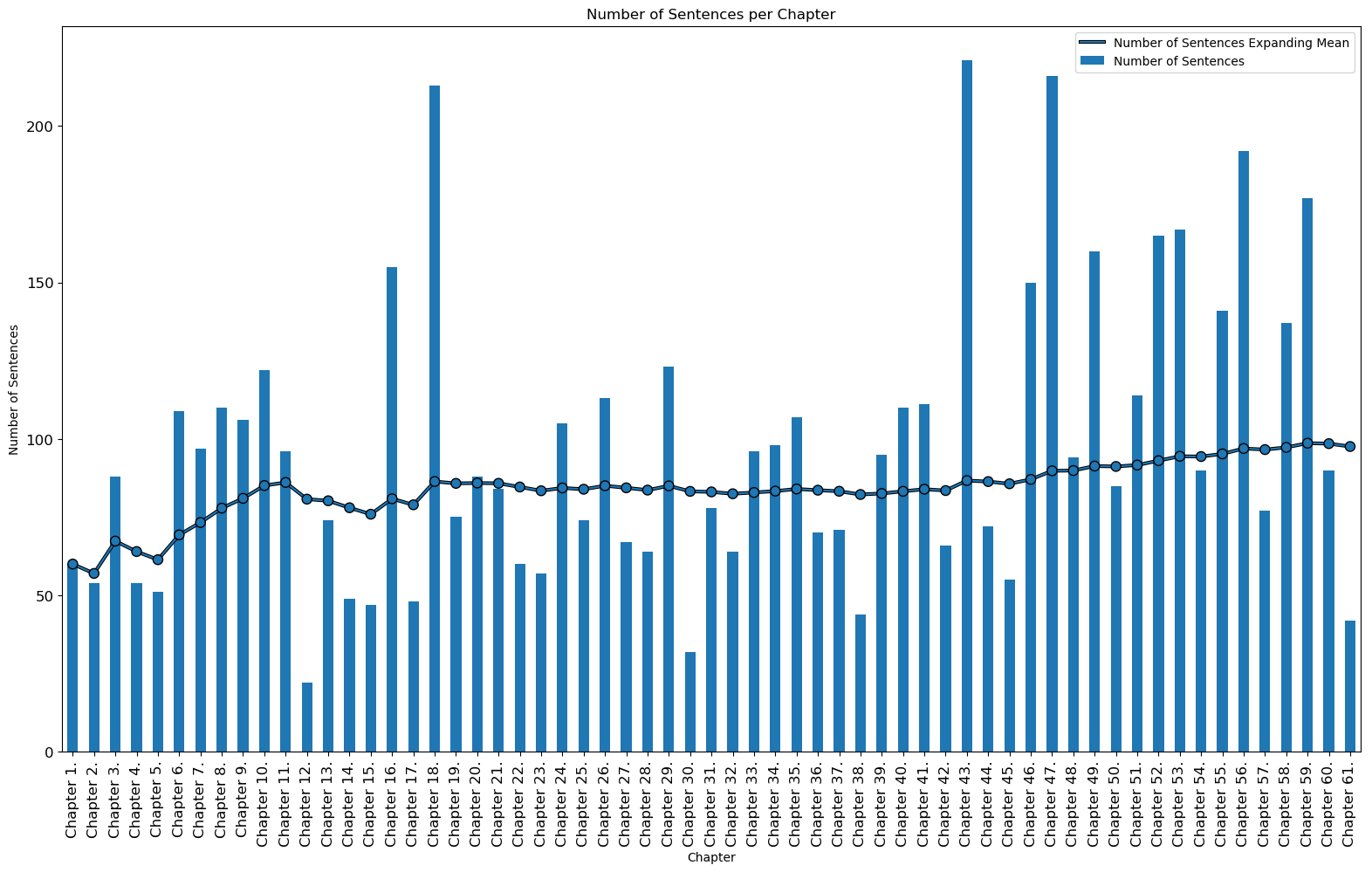 Number of Sentences per Chapter
Number of Words
| Chapter | Number of Words |
|---|---|
| 18 | 5212 |
| 43 | 4873 |
| 47 | 4107 |
| … | … |
| 1 | 847 |
| 2 | 804 |
| 12 | 677 |
| Mean | 2008.59 |
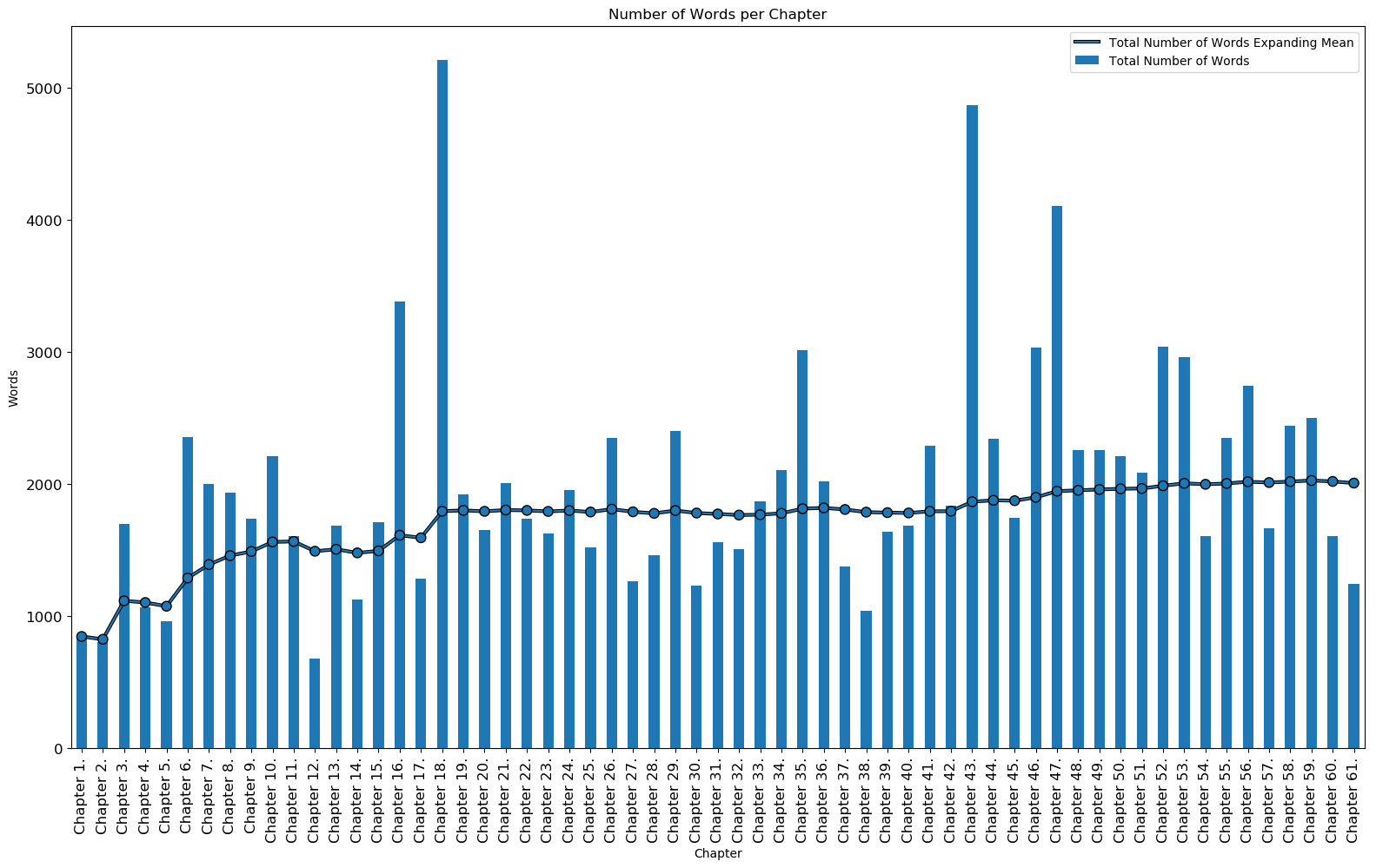 Number of Words per Chapter
Average Number of Words per Sentence
| Chapter | Average Number of Words per Sentence |
|---|---|
| 30 | 38.531250 |
| 15 | 36.404255 |
| 44 | 32.555556 |
| … | … |
| 59 | 14.118644 |
| 1 | 14.116667 |
| 49 | 14.112500 |
| Mean | 21.80 |
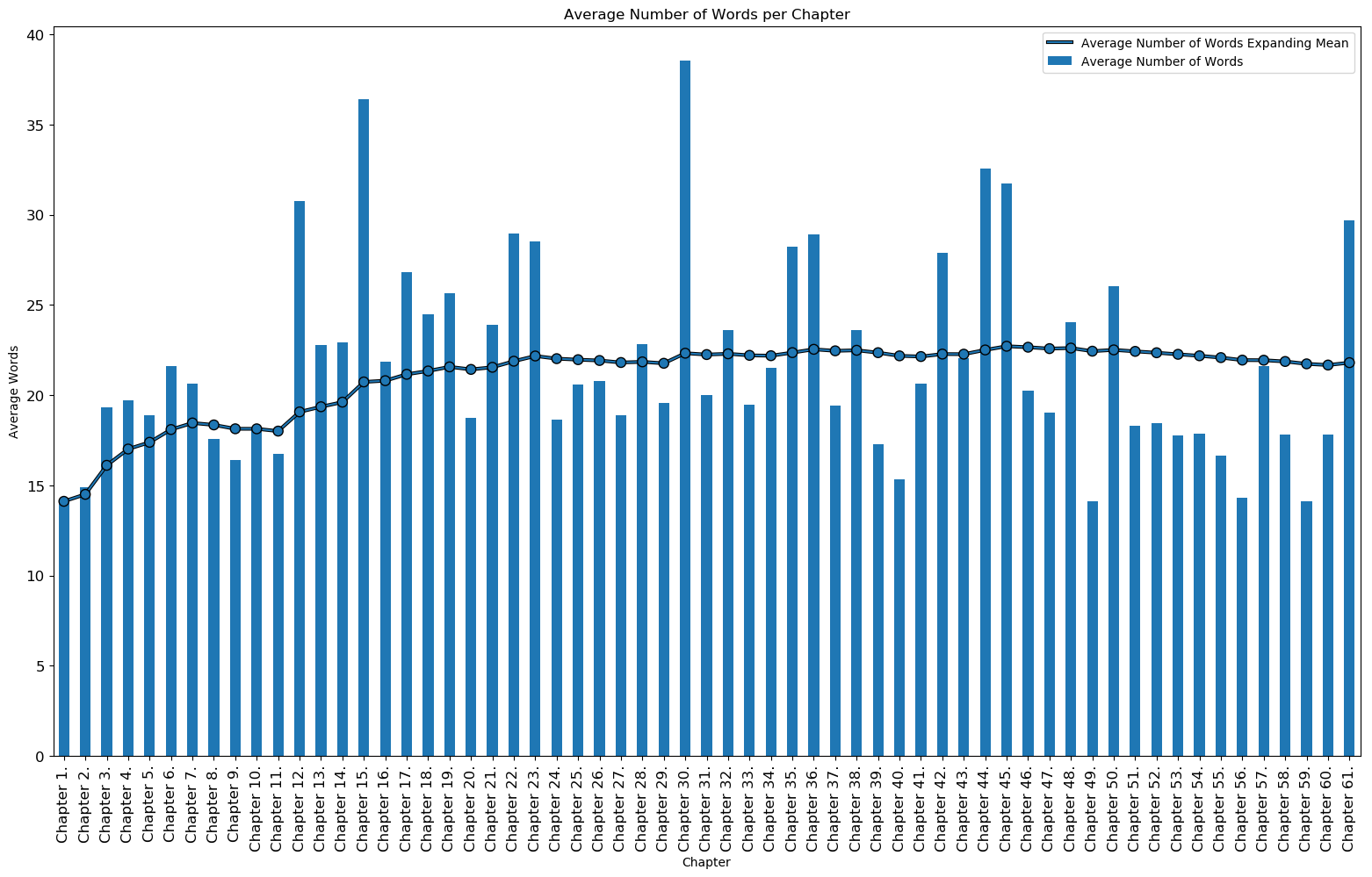 Average Number of Words per Sentence per Chapter
Average Polarity and Subjectivity per Sentence
The average polarity and average subjectivity per sentence for each chapter can be seen below. The most neutral chapters (polarity is close to 0.0) are chapters 46, 40, and 36 while the most positive chapters (polarity is close to 1.0) are chapters 4, 32, and 61. There seemed to be no ‘negative’ polarity chapters (values from [-1.0,0.0]). The most objective chapters (subjectivity is close to 0.0) are chapters 20, 49, 56 while the most subjective chapters (subjectivity is close to 1.0) are chapters 45, 61, and 32.
Average Polarity per Sentence
| Chapter | Average Polarity per Sentence |
|---|---|
| 4 | 0.211535 |
| 32 | 0.209675 |
| 61 | 0.195896 |
| … | … |
| 36 | 0.031730 |
| 40 | 0.025881 |
| 46 | 0.012814 |
| Mean | 0.0983 |
Average Subjectivity per Sentence
| Chapter | Average Subjectivity per Sentence |
|---|---|
| 45 | 0.529880 |
| 61 | 0.484678 |
| 32 | 0.481161 |
| … | … |
| 56 | 0.317918 |
| 49 | 0.301757 |
| 20 | 0.287465 |
| Mean | 0.3888 |
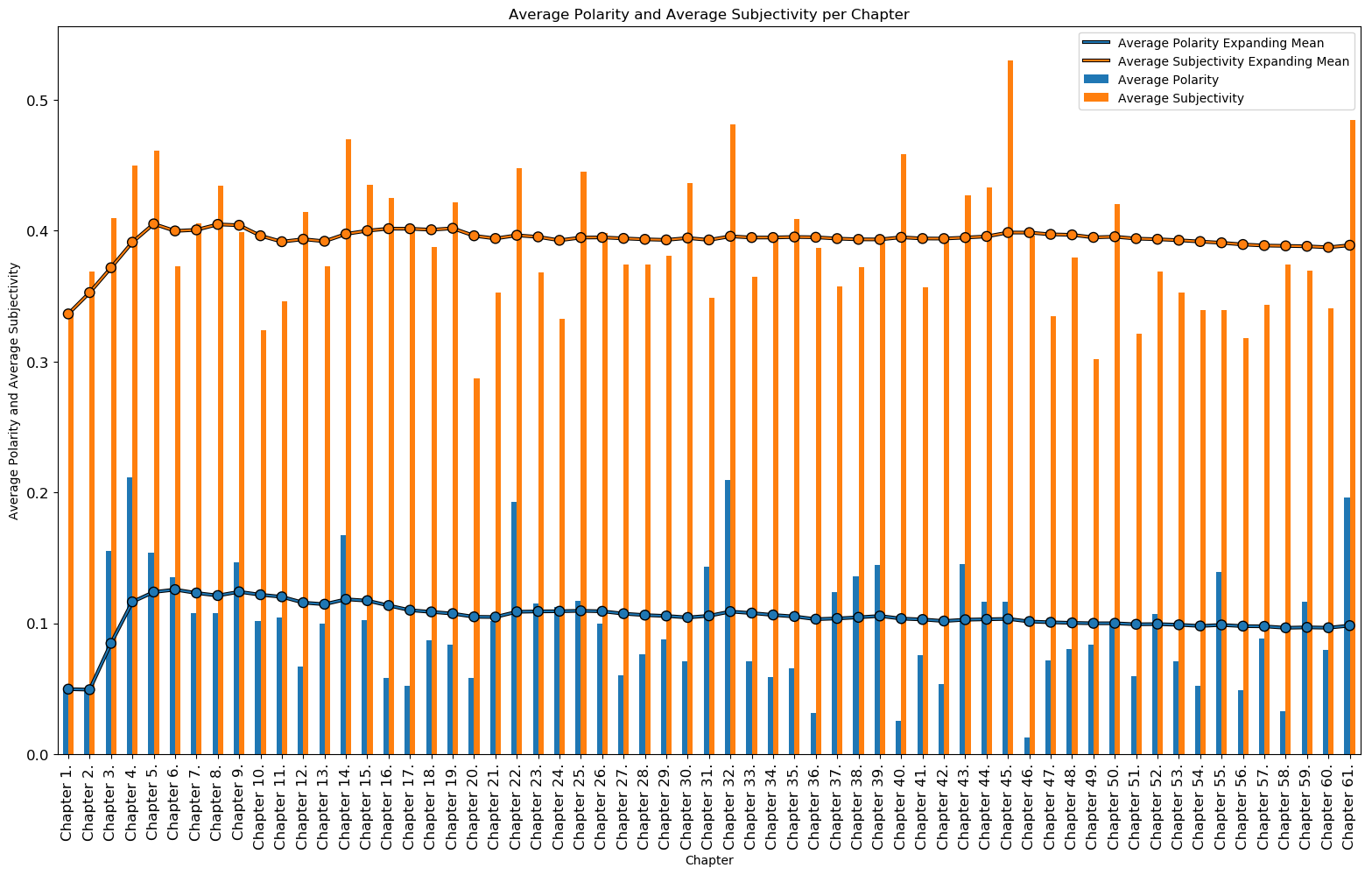 Average Polarity and Average Subjectivity per Sentence per Chapter
Total and Average Specific Words
The number of nouns, verbs, and adjectives and their averages for each chapter can be seen below.
Total Specific Words
The chapters with the most nouns are chapters 43, 18, and 47 while the chapters with the least nouns are chapters 12, 2, and 1. The chapters with the most verbs are chapters 18, 43, and 47 while the chapters with the least verbs are chapters 12, 1, and 2. The chapters with the most adjectives are chapters 18, 43, and 16 while the chapters with the least adjectives are chapters 2, 12, and 1. These counts also correspond to the chapters with the most and least number of words, respectively (except chapter 16 for adjectives which is actually the chapter with the 4th most number of words). The chapters with the most words have a greater chance of having more nouns, verbs, and adjectives.
Total Nouns
| Chapter | Total Nouns |
|---|---|
| 43 | 781 |
| 18 | 763 |
| 47 | 576 |
| … | … |
| 1 | 117 |
| 2 | 97 |
| 12 | 96 |
| Mean | 298.80 |
Total Verbs
| Chapter | Total Verbs |
|---|---|
| 18 | 987 |
| 43 | 936 |
| 47 | 805 |
| … | … |
| 2 | 170 |
| 1 | 163 |
| 12 | 135 |
| Mean | 388.91 |
Total Adjectives
| Chapter | Total Verbs |
|---|---|
| 18 | 349 |
| 43 | 328 |
| 16 | 245 |
| … | … |
| 1 | 65 |
| 12 | 47 |
| 2 | 45 |
| Mean | 126.63 |
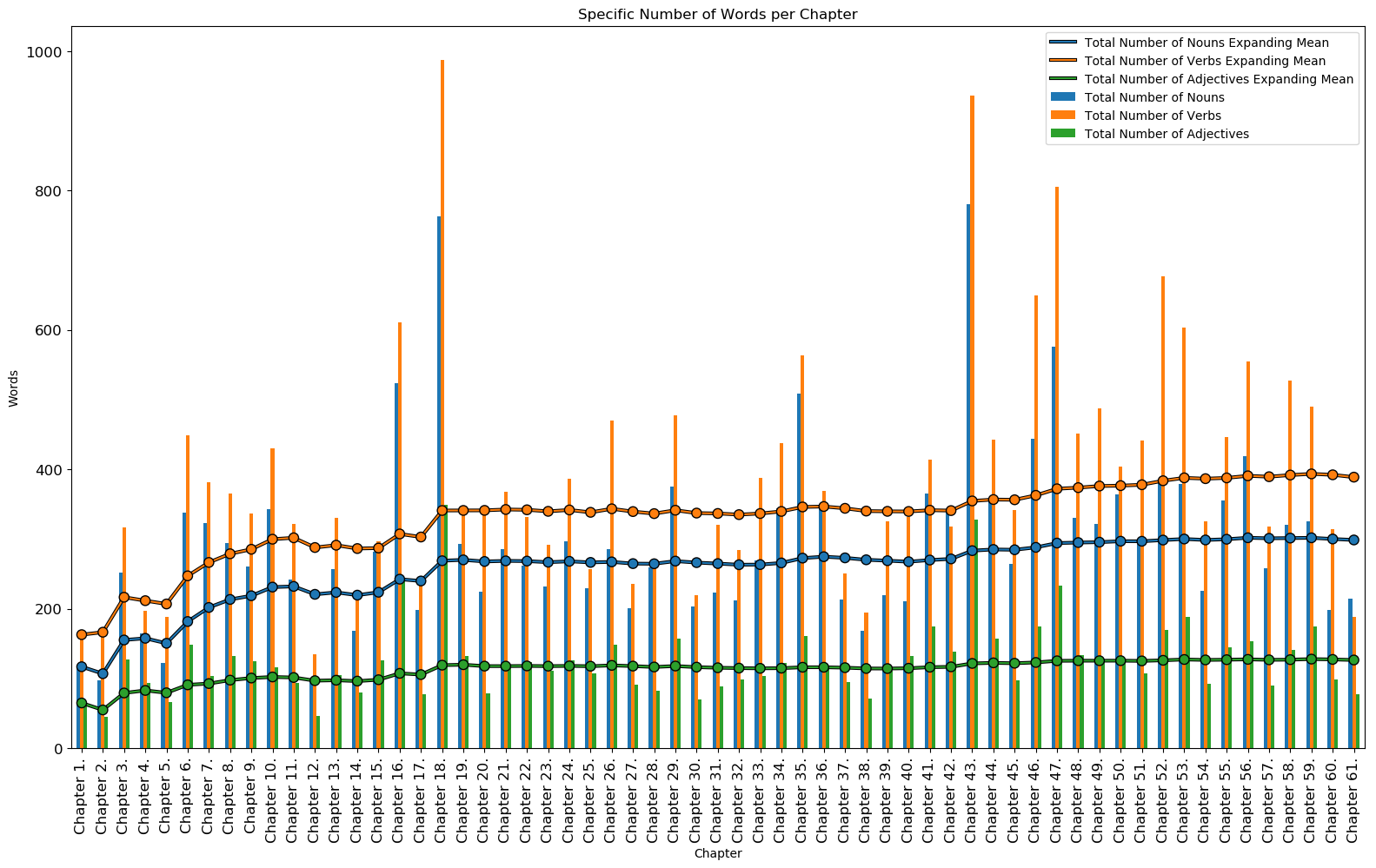 Specific Number of Words per Chapter
Average Specific Words
The average number of nouns, verbs, and adjectives per sentence for each chapter can be seen below. This average is based on the number of sentences per chapter. The chapters with the greatest average of nouns are chapters 30, 15, and 42 while the chapters with the lowest average of nouns are chapters 2, 59, and 40. The chapters with the greatest average of verbs are chapters 30, 15, and 45 while the chapters with the lowest average of verbs are chapters 1, 59, and 56. The chapters with the greatest average of adjectives are chapters 15, 30, and 44 while the chapters with the lowest average of adjectives are chapters 49, 56, and 2.
Average Nouns per Sentence
| Chapter | Average Nouns per Sentence |
|---|---|
| 30 | 6.375000 |
| 15 | 6.000000 |
| 42 | 5.121212 |
| … | … |
| 40 | 1.918182 |
| 59 | 1.836158 |
| 2 | 1.796296 |
| Mean | 3.28 |
Average Verbs per Sentence
| Chapter | Average Verbs per Sentence |
|---|---|
| 30 | 6.843750 |
| 15 | 6.319149 |
| 45 | 6.218182 |
| … | … |
| 56 | 2.890625 |
| 59 | 2.768362 |
| 1 | 2.716667 |
| Mean | 4.16 |
Average Adjectives per Sentence
| Chapter | Average Adjectives per Sentence |
|---|---|
| 15 | 2.680851 |
| 30 | 2.187500 |
| 44 | 2.180556 |
| … | … |
| 2 | 0.833333 |
| 56 | 0.796875 |
| 49 | 0.787500 |
| Mean | 1.38 |
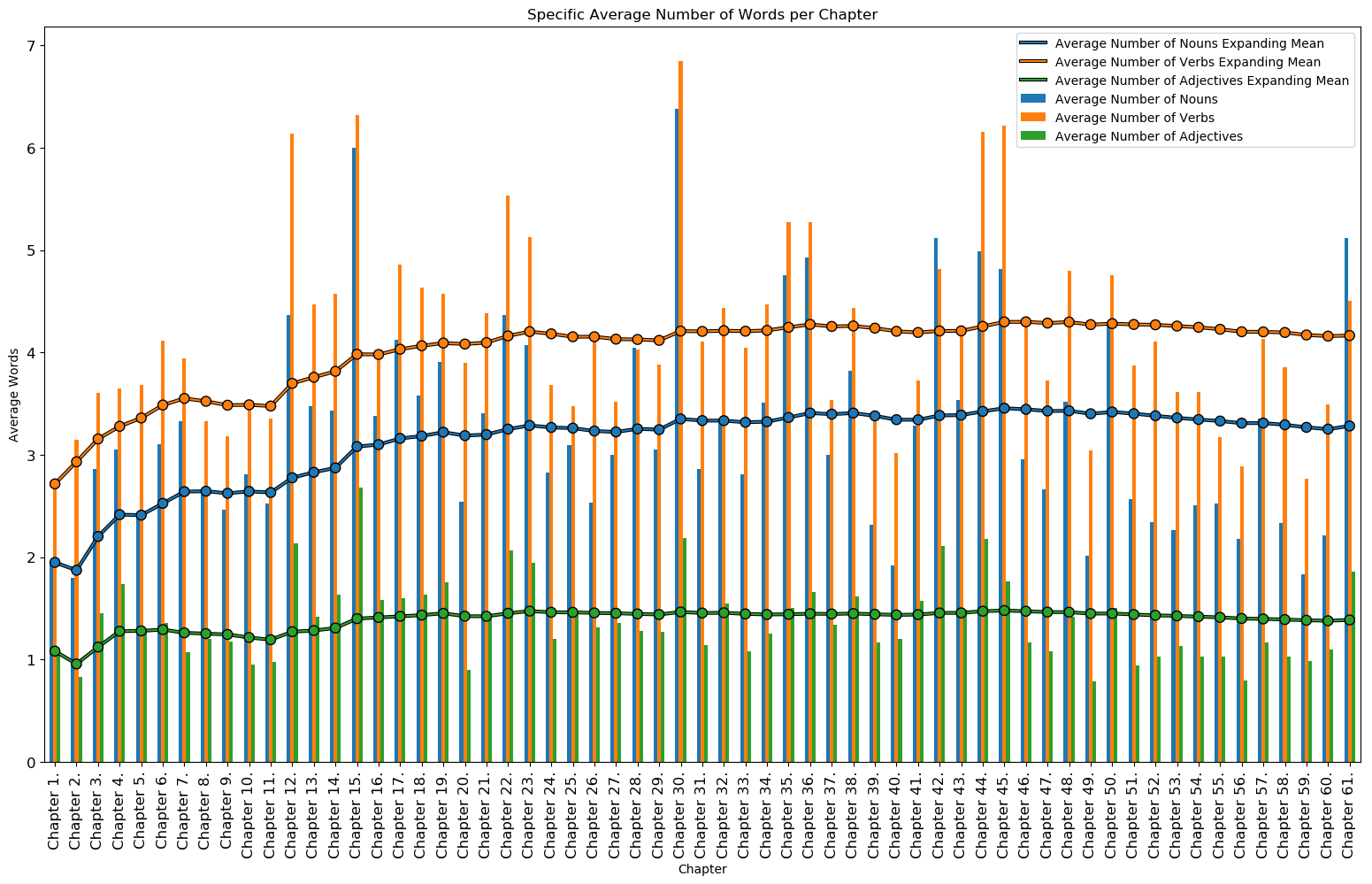 Average Specific Number of Words per Sentence per Chapter
Chapter Histograms
The histograms of the number of sentences, words, specific words, average polarity, and average subjectivy per chapter can be seen below. Most chapters have between 50-100 sentences, around 1500 words, 300 nouns, 300 verbs, 125 adjectives, 0.75 average polarity, and 0.375 average subjectivity. As mentioned previously, it would be interesting to try and fit a distribution to this data.
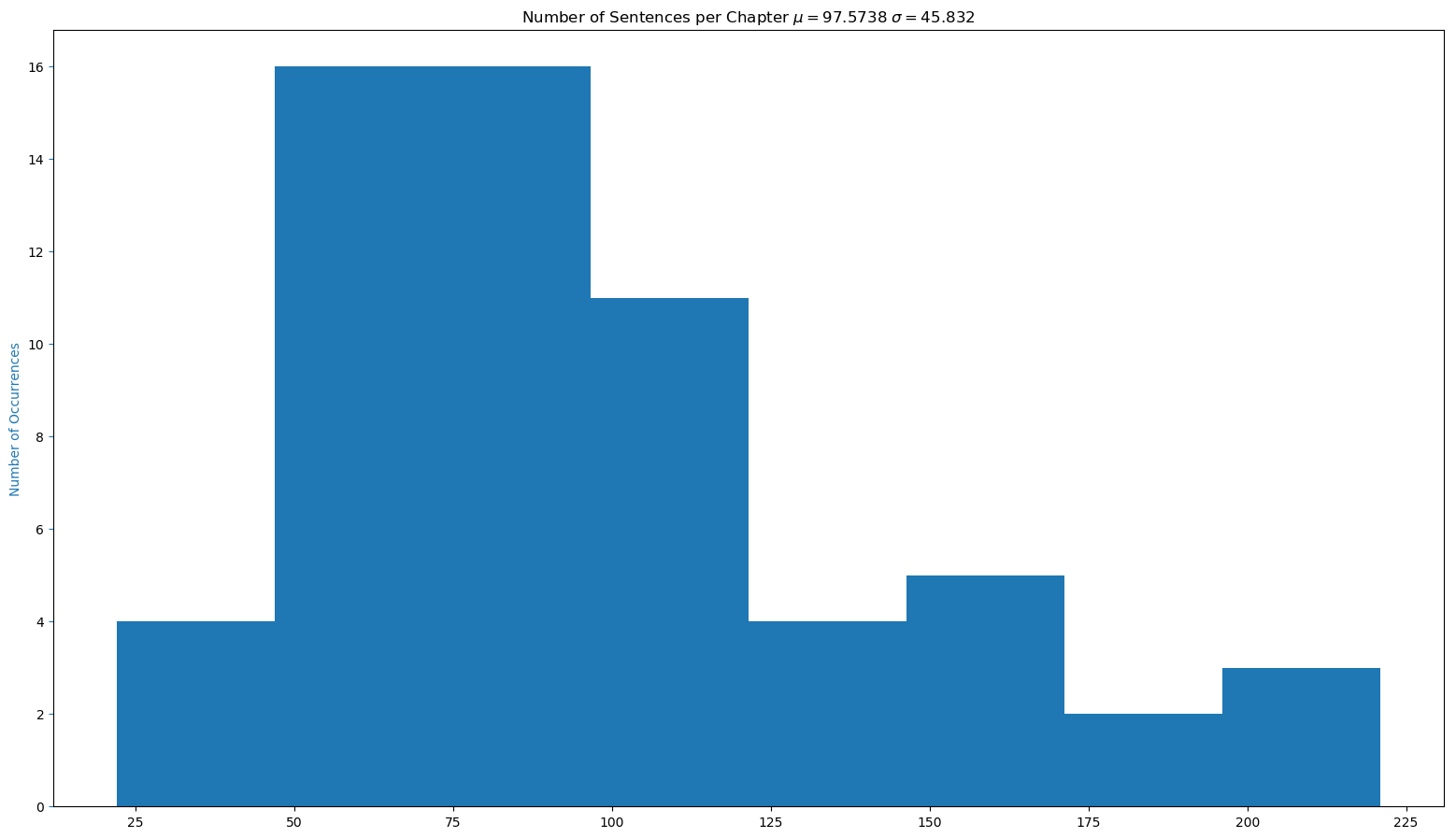 Histogram of Number of Sentences per Chapter
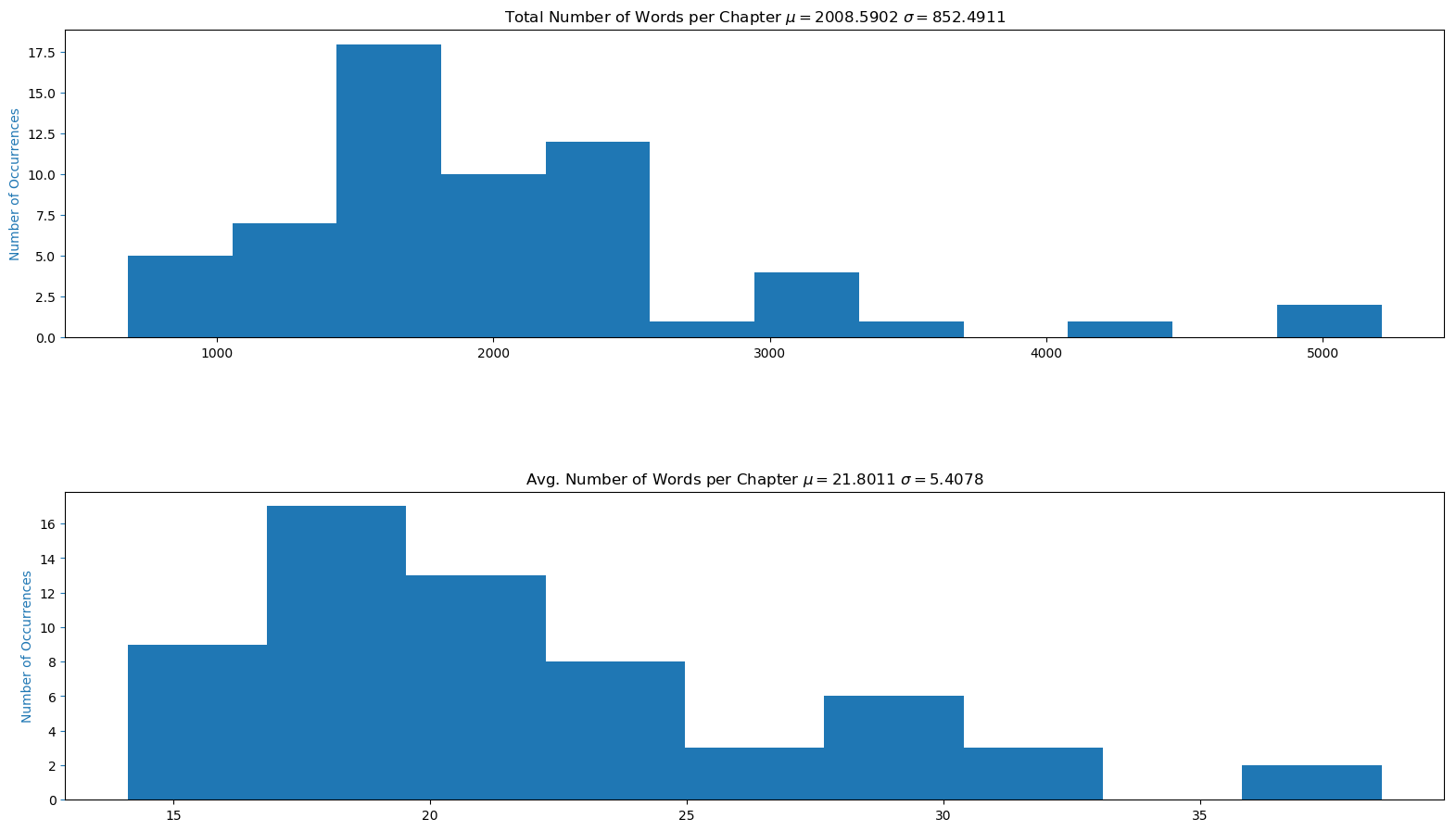 Histogram of Words per Chapter
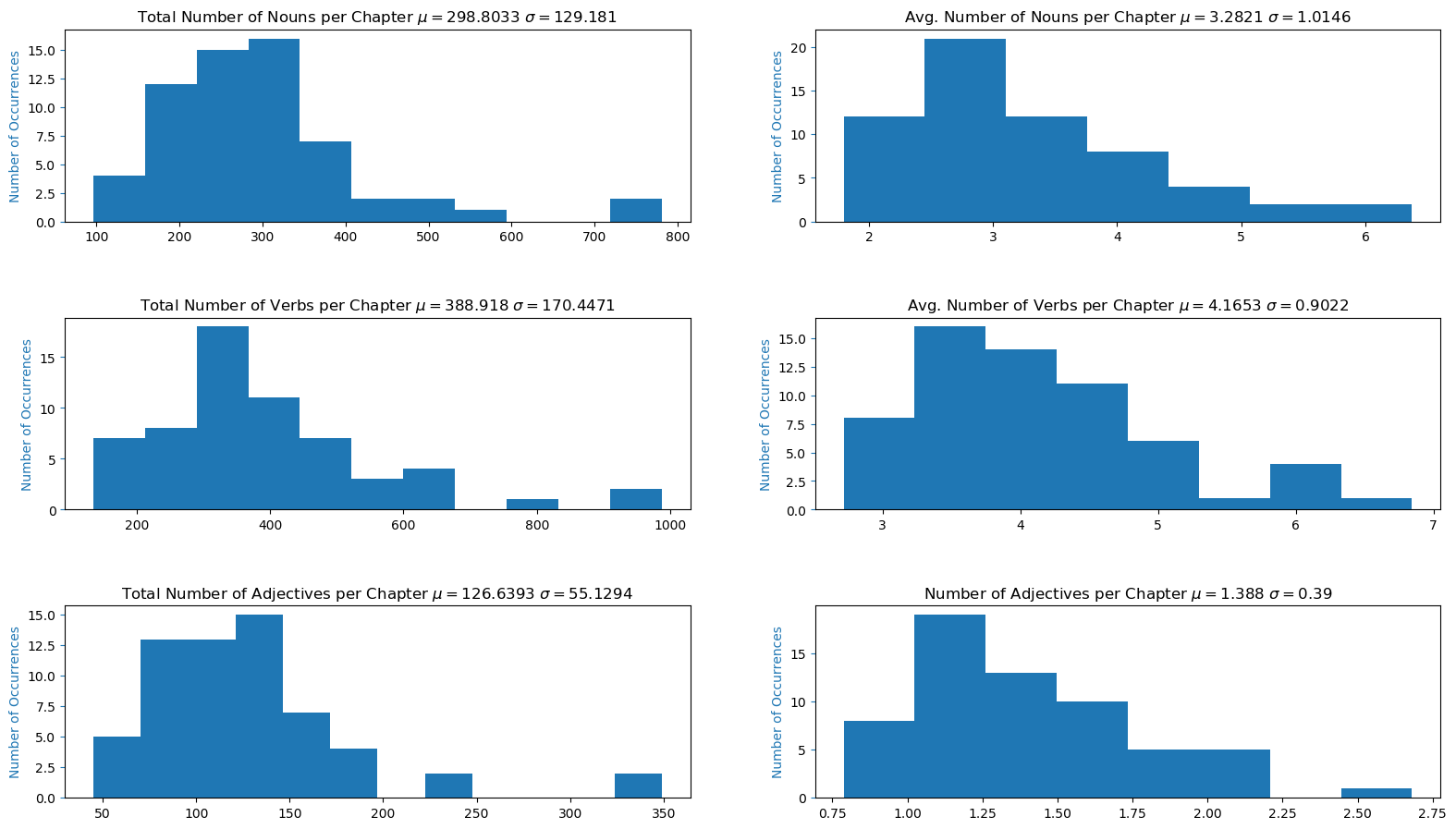 Histogram of Specific Words per Chapter
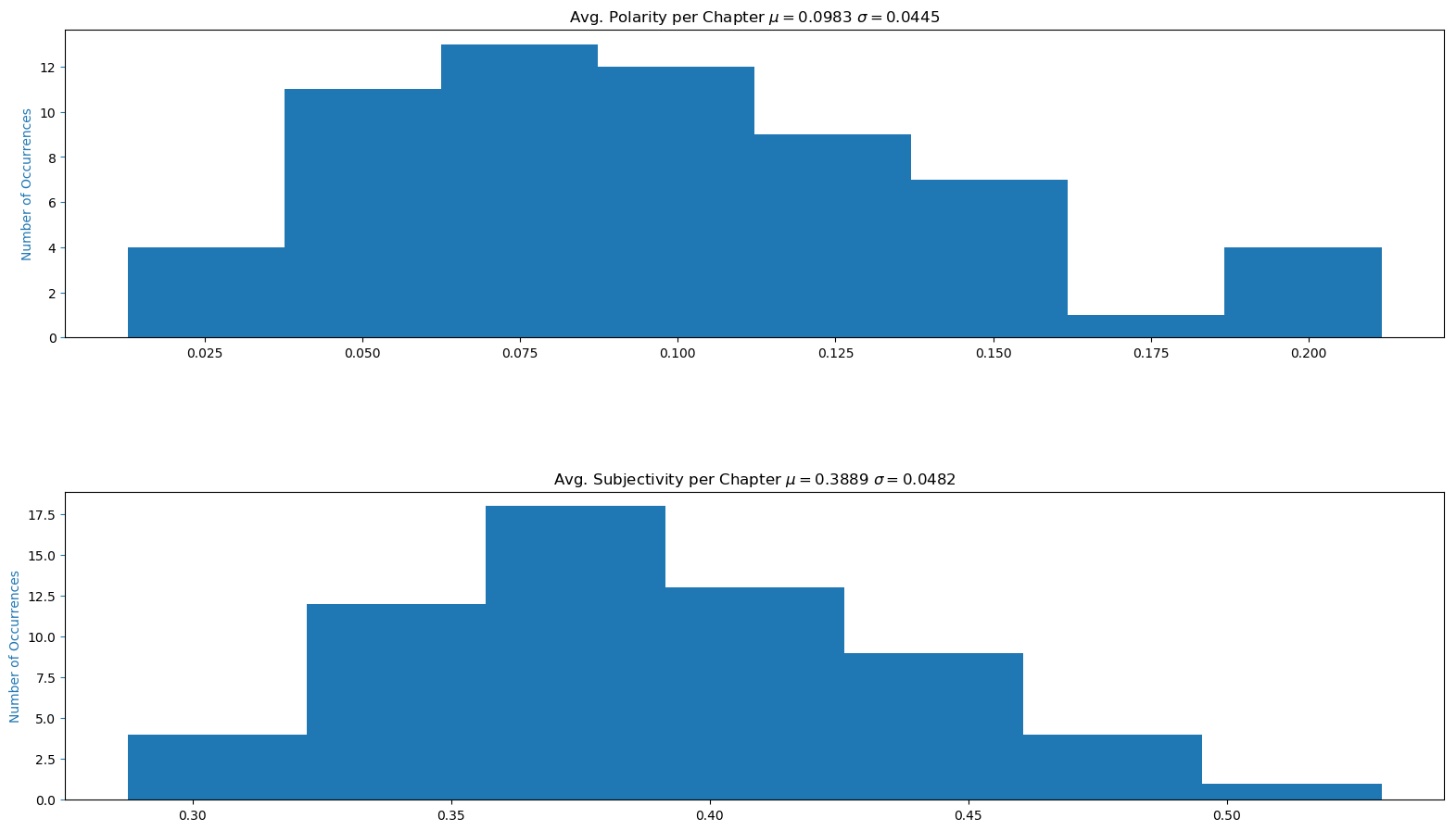 Histogram of Polarity and Subjectivity per Chapter